
English Below
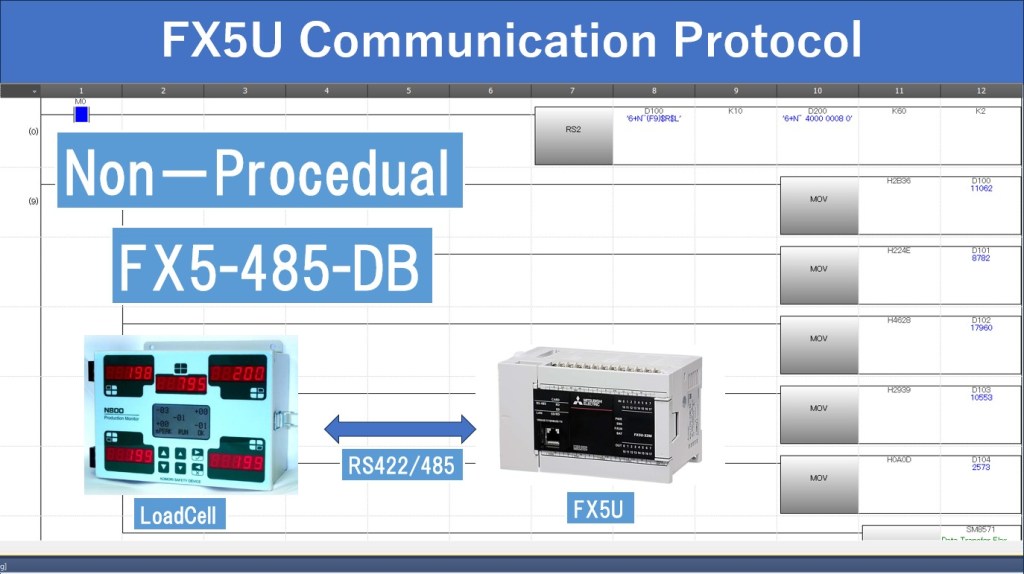
Trong các ứng dụng tự động hóa công nghiệp, việc kết nối và thu thập dữ liệu từ các cảm biến bên ngoài là điều rất quan trọng để đo lường và kiểm soát các thông số trong quy trình sản xuất. Một trong những phương pháp phổ biến để thực hiện việc này là thông qua giao tiếp nối tiếp với giao thức Non-Procedural Communication sử dụng mô-đun mở rộng FX5-485-DB của Mitsubishi FX5U PLC.
Bài viết này sẽ hướng dẫn chi tiết về cách sử dụng mô-đun FX5-485-DB trong GX Works3, sử dụng lệnh RS2 để thực hiện giao tiếp với Loadcell.
1. Tổng quan về Non-Procedural Communication
Non-Procedural Communication (Giao tiếp không tuần tự) là phương thức truyền dữ liệu mà không cần quy trình xác thực phức tạp, hay kiểm tra kết nối giữa hai thiết bị. Giao thức này thường được sử dụng trong các trường hợp mà thiết bị ngoại vi, như Loadcell Bar code Reader, máy in…với yêu cầu chỉ cần truyền dữ liệu đơn giản và liên tục.
Phương pháp này phù hợp cho các ứng dụng không yêu cầu độ chính xác cao trong kiểm soát giao tiếp nhưng cần tốc độ và sự đơn giản trong vận hành.
2. Giới thiệu mô-đun FX5-485-DB
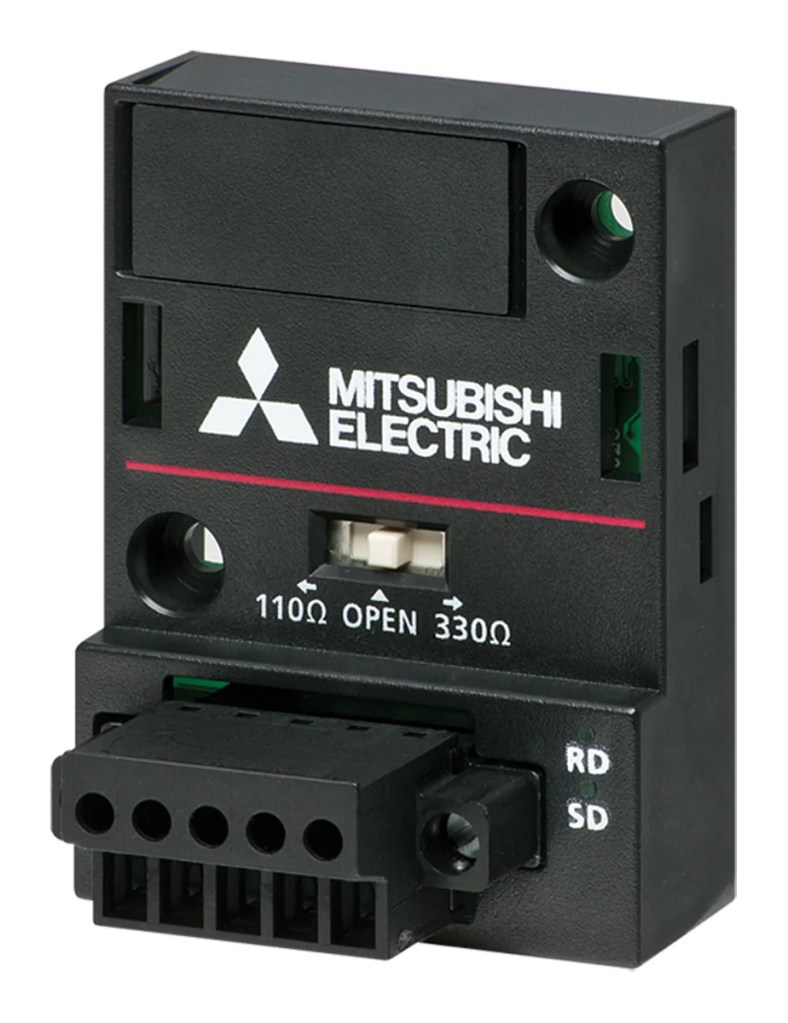
Mô-đun FX5-485-DB là một mô-đun mở rộng của PLC dòng FX5U, cung cấp các cổng truyền thông RS-485 để kết nối với nhiều thiết bị bên ngoài. RS-485 là một chuẩn giao tiếp nối tiếp phổ biến nhờ khả năng truyền dữ liệu ổn định trên khoảng cách dài và khả năng kết nối nhiều thiết bị trên cùng một mạng.
3. Kết nối phần cứng
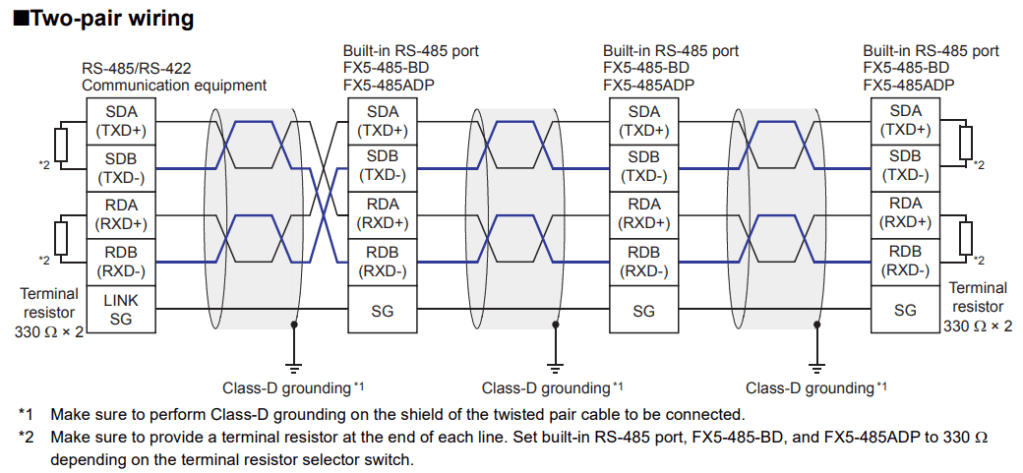
Trước khi lập trình, bạn cần thiết lập kết nối vật lý giữa PLC và Loadcell như sau:
FX5-485-DB là cổng mở rộng tương ứng CH2.

Sơ đồ nối dây
4. Cấu hình mô-đun FX5-485-DB trên GX Works3
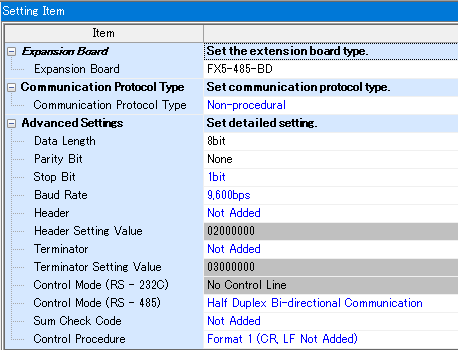
Sau khi hoàn thành kết nối phần cứng, bạn cần cấu hình thông số truyền thông cho mô-đun trong phần mềm GX Works3.
tham khảo thêm video tại đây!
Các bước cấu hình:
- Mở dự án trong GX Works3.
- Vào phần Navigation và chọn Module Parameter cho mô-đun FX5-485-DB.
- Chọn chế độ giao tiếp Non-Procedural.
- Thiết lập các thông số truyền thông, như:
- Baud Rate (Tốc độ truyền): 9600 bps hoặc theo yêu cầu của Loadcell.
- Data Bits (Số bit dữ liệu): 8 bit.
- Parity (Bit chẵn lẻ): None (Không có).
- Stop Bit: 1 bit.
- Lưu cài đặt và tải chúng vào PLC.
5. Lập trình giao tiếp Non-Procedural với lệnh RS2
Để thực hiện truyền thông, bạn sẽ sử dụng lệnh RS2 để gửi và nhận dữ liệu.
Cấu trúc lệnh RS2:

- D100: Địa chỉ thanh ghi chưa dữ liệu gủi đi ( D100~D109)
- K10: Số lượng thanh ghi dùng để lưu dữ liệu gủi đi
- D200: Địa chỉ thanh ghi chứa dữ liệu trả về ( D200~D259)
- K60: Số lượng thanh ghi dùng để nhận dữ liệu trả về
- K2: kênh sử dụng để truyền thông, ở đây FX5-485-DB là CH2
6. Kiểm tra hoạt động truyền thông
Sau khi lập trình và cấu hình hoàn tất, bạn có thể kiểm tra hoạt động của hệ thống như sau:
- Giám sát trạng thái đèn LED trên mô-đun FX5-485-DB:
- SD (Send Data): Bật khi dữ liệu đang được truyền đi.
- RD (Receive Data): Bật khi dữ liệu đang được nhận.
- Giám sát trong GX Works3:
- Kiểm tra giá trị dữ liệu trong các thanh ghi nhớ D200, D201, v.v. để xác nhận dữ liệu đã được Loadcell truyền về thành công.
Các lưu ý quan trọng
- Đúng cấu hình phần cứng: Đảm bảo Loadcell và mô-đun FX5-485-DB được kết nối đúng và chắc chắn.
- Kiểm tra thông số giao tiếp: Thông số giao tiếp (tốc độ baud, số bit dữ liệu, parity) trên PLC và Loadcell phải khớp nhau.
- Chỉ định đúng địa chỉ: Địa chỉ vùng nhớ trong lệnh RS2 phải phù hợp với dữ liệu cần gửi và nhận.
In industrial automation applications, connecting and collecting data from external sensors is essential for measuring and controlling parameters in the production process. One of the most common methods to achieve this is by using serial communication with the Non-Procedural Communication protocol through the FX5-485-DB extension module of the Mitsubishi FX5U PLC.
This article provides a detailed guide on how to use the FX5-485-DB module in GX Works3, using the RS2 command to communicate with a Loadcell.
1. Overview of Non-Procedural Communication
Non-Procedural Communication is a data transmission method that does not require complex verification procedures, such as handshake or connection checks between devices. This protocol is often used when external devices such as Loadcells, barcode readers, printers, etc., only require simple and continuous data transmission.
This method is suitable for applications that do not require high communication accuracy but prioritize speed and simplicity in operation.
2. Introduction to the FX5-485-DB Module
The FX5-485-DB module is an expansion module for the FX5U PLC, providing RS-485 communication ports to connect to multiple external devices. RS-485 is a widely used serial communication standard known for its stable data transmission over long distances and the ability to connect multiple devices on the same network.
3. Hardware Connection
Before programming, you need to establish a physical connection between the PLC and the Loadcell as follows:
- The FX5-485-DB module corresponds to CH2 for the communication channel.
Wiring Diagram:
4. Configuring the FX5-485-DB Module in GX Works3
After completing the hardware connection, you need to configure the communication parameters for the module in GX Works3.
Refer to the video guide here!
Configuration Steps:
- Open the project in GX Works3.
- Navigate to Module Parameter in the Navigation section and select the FX5-485-DB module.
- Choose the communication mode as Non-Procedural.
- Set the communication parameters as follows:
- Baud Rate: 9600 bps or according to the Loadcell’s requirements.
- Data Bits: 8 bits.
- Parity: None.
- Stop Bit: 1 bit.
- Save the settings and write them to the PLC.
5. Programming Non-Procedural Communication with RS2 Command
To perform communication, you will use the RS2 command to send and receive data.
RS2 Command Structure:
Example:
- D100: Starting address for sending data (e.g., D100 to D109).
- K10: Number of registers used to store outgoing data.
- D200: Starting address for received data (e.g., D200 to D259).
- K60: Number of registers for receiving data.
- K2: Communication channel (CH2 for FX5-485-DB).
6. Communication Operation Check
After programming and configuration are complete, you can check the system’s communication status as follows:
Monitor LED Status on the FX5-485-DB Module:
- SD (Send Data): Turns on when data is being transmitted.
- RD (Receive Data): Turns on when data is being received.
Monitor in GX Works3:
- Check the values in data registers D200, D201, etc., to confirm that the Loadcell’s data has been successfully transmitted to the PLC.
7. Important Notes
- Correct hardware setup: Ensure that the Loadcell and FX5-485-DB module are properly and securely connected.
- Communication parameter consistency: The communication parameters (baud rate, data bits, parity) must match between the PLC and Loadcell.
- Proper memory address allocation: The memory addresses in the RS2 command must match the data to be sent and received.
By following these steps and notes, you can effectively implement Non-Procedural Communication between the FX5U PLC and a Loadcell using the FX5-485-DB module.
 Automation and Industrial Networks