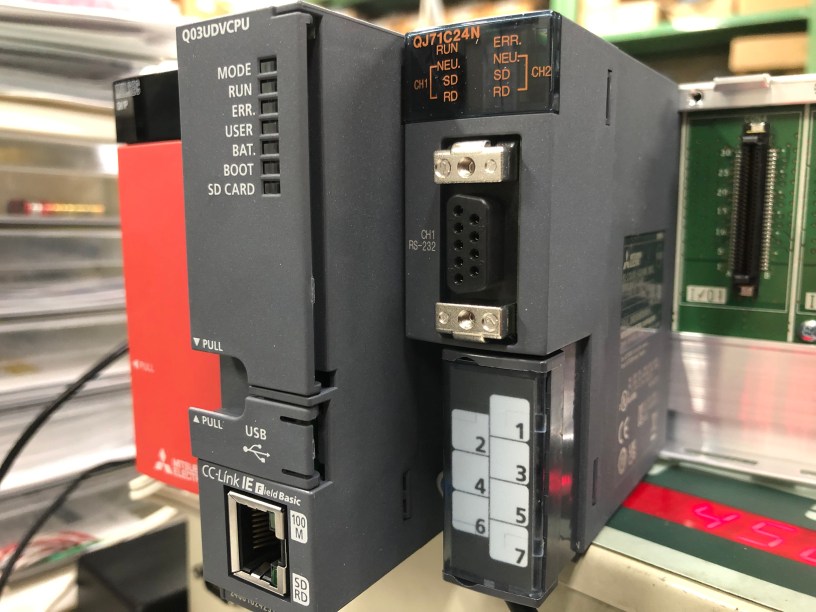
1.1 QJ71C24N(R2/R4)Serial Communication Unit là gì?
QJ71C24N Serial Communication Unit (Module truyền thông nối tiếp) là một mô-đun được sử dụng để kết nối CPU của PLC dòng Q-Series với thiết bị đối tác thông qua các chuẩn truyền thông nối tiếp như RS-232 hoặc RS-422/485, nhằm thực hiện việc trao đổi dữ liệu.
Các chức năng chính:
Trao đổi dữ liệu theo định dạng tùy chỉnh dựa trên thông số kỹ thuật của thiết bị đối tác.
Thu thập dữ liệu đo lường từ thiết bị như máy đo lường, cảm biến.
Kết nối với máy tính có phần mềm GX Works2 để điều khiển PLC.
1.2 Các loại chức năng giao tiếp dữ liệu
Serial Communication Unit có nhiều phương thức để giao tiếp dữ liệu với thiết bị ngoại vi, bao gồm:
MC Protocol (Giao thức MC)
Non-Procedural Protocol (Giao thức không theo trình tự)
Bidirectional Protocol (Giao thức hai chiều)
Communication Protocol (Giao thức truyền thông)
Ngoài ra, mô-đun này còn hỗ trợ các chức năng mở rộng như truyền thông trực tuyến (Online Communication) hoặc tính năng giao tiếp theo yêu cầu từ CPU.
Trong loạt bài viết này sẽ tập trung vào hai giao thức chính: MC Protocol và Non-Procedural Protocol.
1.2.1 Non-Procedural Protocol là gì?
Non-Procedural Protocol là giao thức cho phép truyền dữ liệu theo định dạng tùy chỉnh dựa trên thông số kỹ thuật của thiết bị đối tác, chẳng hạn như máy đo lường hoặc máy quét mã vạch.
Truyền dữ liệu tùy chỉnh: Dữ liệu được gửi và nhận theo định dạng mà thiết bị đối tác yêu cầu, không cần phải tuân theo từng bước trình tự nghiêm ngặt.
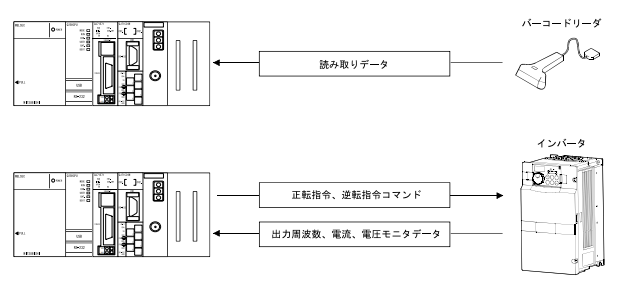
Cần chương trình điều khiển: Khi giao tiếp với các thiết bị đo lường hoặc đầu đọc mã vạch, cần phải lập trình PLC để xử lý dữ liệu theo đúng giao thức của thiết bị đối tác. Ví dụ, mô-đun sẽ đọc dữ liệu từ máy quét mã vạch hoặc giám sát dữ liệu từ thiết bị đo và xử lý phản hồi theo yêu cầu.
PLC nhận dữ liệu từ Barcode Reader.
Điều khiển Biến Tần.
1.2.2 MC Protocol là gì?
MC Protocol (Mitsubishi Communication Protocol) là giao thức truyền thông đặc trưng của Mitsubishi Electric. Giao thức này cho phép QJ71C24N và thiết bị đối tác giao tiếp với nhau bằng cách sử dụng các khung dữ liệu định sẵn, giúp trao đổi dữ liệu một cách dễ dàng và hiệu quả.
Khi thiết bị đối tác cần gửi lệnh hoặc yêu cầu dữ liệu, MC Protocol sẽ xử lý lệnh theo cấu trúc khung giao tiếp và thực hiện gửi/nhận dữ liệu một cách tự động mà không cần chương trình phức tạp trên PLC.
Các chức năng của MC Protocol:
Giao tiếp dữ liệu theo yêu cầu từ thiết bị đối tác: Các lệnh điều khiển và yêu cầu dữ liệu có thể được gửi từ thiết bị đối tác như máy tính, HMI hoặc các chương trình giám sát. PLC sẽ phản hồi lệnh và gửi lại dữ liệu theo yêu cầu mà không cần lập trình thủ công trên PLC.Ví dụ:
PLC nhận và xử lý lệnh từ phần mềm giám sát trên máy tính thông qua khung dữ liệu gồm lệnh, dữ liệu yêu cầu, và trả về kết quả phản hồi.
Các ứng dụng của MC Protocol trong sản xuất: (1) Giám sát trạng thái hoạt động của thiết bị:
Các trạng thái vận hành của dây chuyền sản xuất hoặc thiết bị có thể được giám sát trực quan trên giao diện đồ họa của thiết bị đối tác.Ví dụ: Trên màn hình HMI, trạng thái làm việc của PLC được hiển thị rõ ràng bằng các biểu tượng hoặc đồ thị.
(2) Thu thập và phân tích dữ liệu:
MC Protocol cho phép thu thập dữ liệu sản xuất như sản lượng, thời gian hoạt động, và tình trạng thiết bị.
Các dữ liệu này được hiển thị dưới dạng bảng hoặc biểu đồ giúp người dùng dễ dàng theo dõi và phân tích hiệu suất của dây chuyền sản xuất.
1.3 Công cụ hỗ trợ cho QJ71C24N(R2/R4)
Các công cụ hỗ trợ trong GX Works2 giúp thực hiện các thao tác cần thiết cho module QJ71C24N(R2/R4), bao gồm:
Cài đặt ban đầu,
Giám sát/kiểm tra,
Tạo chương trình điều khiển trong quá trình xử lý dữ liệu.
(1) Chức năng điều khiển mô-đun Intelligent Function Unit
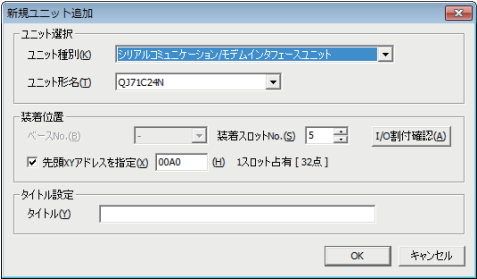
Chức năng này trong GX Works2 cho phép thực hiện các thiết lập ban đầu cho mô-đun QJ71C24N(R2/R4) mà không cần quan tâm nhiều đến tín hiệu đầu vào/ra hoặc bộ nhớ buffer. Bạn có thể dễ dàng tiến hành các thao tác như cấu hình mô-đun, giám sát, và kiểm tra thông qua giao diện trực quan.
(2) Chức năng hỗ trợ giao thức truyền thông
Chức năng này được sử dụng khi mô-đun QJ71C24N (R2/R4) cần truyền dữ liệu theo một giao thức truyền thông cụ thể.
Thiết lập giao thức: Người dùng có thể dễ dàng lựa chọn và cấu hình giao thức cần thiết cho việc trao đổi dữ liệu thông qua giao diện thiết lập giao thức trong phần mềm. Các cài đặt sau đó sẽ được lưu trữ vào bộ nhớ ROM của mô-đun.
Chức năng nâng cao: Chức năng này còn hỗ trợ các tác vụ như đọc/ghi dữ liệu giao tiếp, giúp việc kiểm tra và chẩn đoán trạng thái truyền thông trở nên dễ dàng hơn.
Lợi ích: Việc sử dụng chức năng này giảm bớt khối lượng công việc lập trình cho PLC vì các lệnh giao tiếp được xử lý tự động.
Cấu trúc hệ thống
Nội dung này giải thích về cấu trúc hệ thống cần thiết để thực hiện truyền dữ liệu bằng cách sử dụng Serial Communication Unit.
2.1 Cấu trúc hệ thống truyền dữ liệu
Hệ thống sử dụng Serial Communication Unit có thể được thiết kế theo nhiều kiểu cấu hình khác nhau. Các mô hình kết nối giữa CPU và thiết bị ngoại vi bao gồm:
Kết nối 1:1, nơi một thiết bị giao tiếp với một CPU.
Kết nối 1:n hoặc n:m, nơi một CPU có thể giao tiếp với nhiều thiết bị hoặc nhiều CPU giao tiếp với nhau.
Kết nối giữa mô-đun và thiết bị đối tác thường sử dụng hai loại cổng:
RS-232/422 dành cho kết nối một thiết bị.
RS-422/485 hỗ trợ truyền thông với nhiều thiết bị.
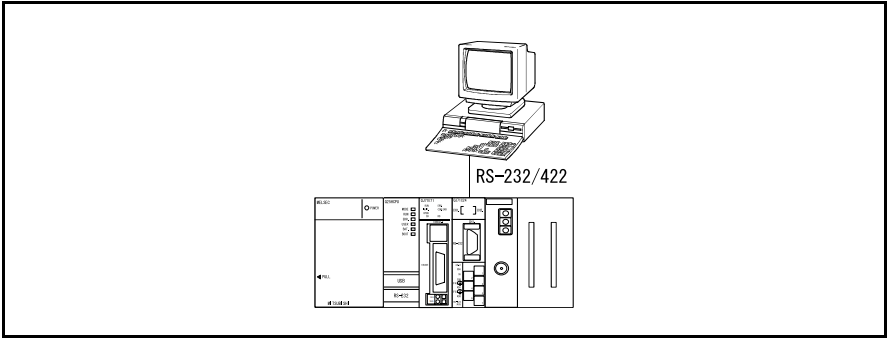
Trong mô hình này, một thiết bị đối tác (như máy tính, HMI) kết nối trực tiếp với mô-đun Serial Communication Unit thông qua cổng RS-232 hoặc RS-422.
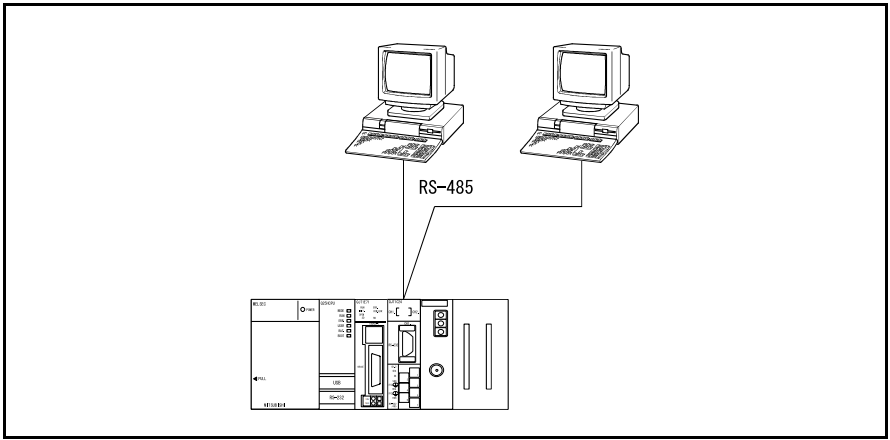
Trường hợp thiết bị đối tác và mô-đun truyền thông nối tiếp có cấu hình n:1
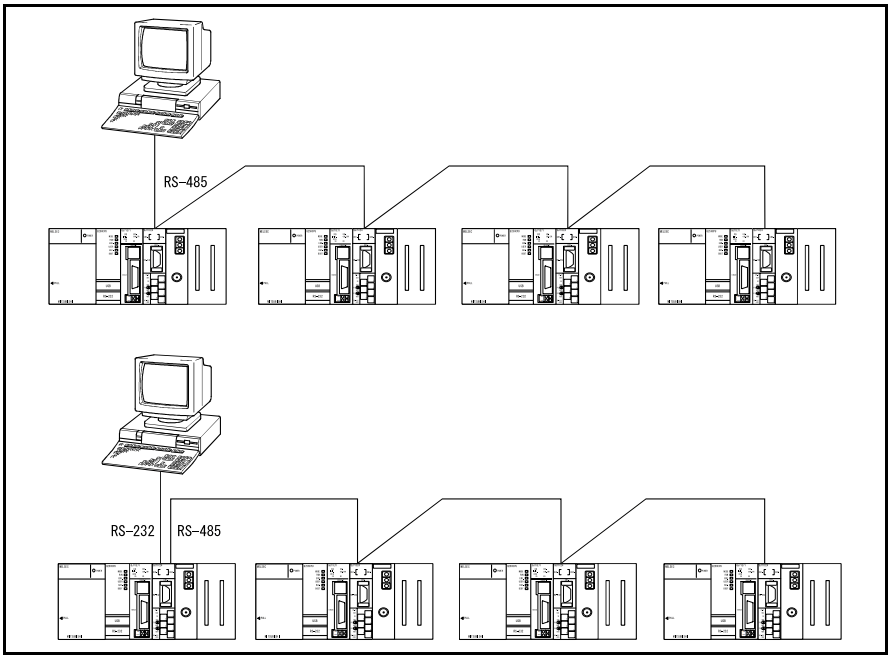
Trường hợp thiết bị đối tác và mô-đun truyền thông nối tiếp có cấu hình 1:n
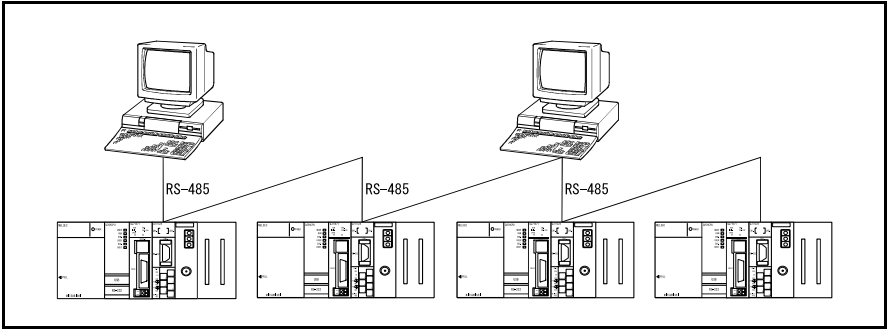
Trường hợp thiết bị đối tác và mô-đun truyền thông nối tiếp có cấu hình m:n
Còn nữa …
Overview
1.1 What is the QJ71C24N (R2/R4) Serial Communication Unit?
The QJ71C24N Serial Communication Unit is a module used to connect the CPU of the Q-Series PLC to partner devices via serial communication standards such as RS-232 or RS-422/485, facilitating data exchange.
Main functions:
Data exchange in customizable formats based on the specifications of the partner device.
Collecting measurement data from devices such as measuring instruments and sensors.
Connecting to a computer with GX Works2 software to control the PLC.
1.2 Types of Data Communication Functions
The Serial Communication Unit supports multiple data communication methods with peripheral devices, including:
MC Protocol
Non-Procedural Protocol
Bidirectional Protocol
Communication Protocol
Additionally, the module supports advanced features such as online communication and communication on demand from the CPU.
This series of articles will focus on two main protocols: MC Protocol and Non-Procedural Protocol.
1.2.1 What is the Non-Procedural Protocol?
The Non-Procedural Protocol allows data to be transmitted in a customizable format based on the specifications of the partner device, such as measuring instruments or barcode scanners.
Custom data transmission: Data is sent and received in the format required by the partner device without needing to follow a strict step-by-step procedure.
Control program required: When communicating with devices like measuring instruments or barcode scanners, PLC programs must be written to process data according to the protocol of the partner device.
Example Applications:
The PLC receives data from a barcode reader.
Control of an inverter.
1.2.2 What is the MC Protocol?
MC Protocol (Mitsubishi Communication Protocol) is Mitsubishi Electric’s proprietary communication protocol, allowing data exchange between the QJ71C24N module and partner devices using predefined data frames.
Automatic command handling: When a partner device sends commands or data requests, the protocol automatically processes and transmits data without requiring complex PLC programming.
Functions of the MC Protocol:
On-demand communication: Partner devices can send commands or data requests, and the PLC responds without the need for manual programming.
Applications in production:
Monitoring the operational status of devices on an HMI.
Collecting and analyzing production data, such as output, operation time, and equipment status.
1.3 Support Tools for QJ71C24N (R2/R4)
Support tools in GX Works2 assist with the following tasks for the QJ71C24N (R2/R4) module:
Initial setup: Configuring the module for operation.
Monitoring and diagnostics: Observing and testing the module’s status.
Control program creation: Assisting in programming data processing operations.
Detailed Functions:
Intelligent Function Unit Control: This function allows users to configure and monitor the module through an intuitive interface without direct manipulation of I/O signals or buffer memory.
Communication Protocol Support:
Protocol setup: Users can easily select and configure the required communication protocol through the software interface, with settings stored in the module’s ROM.
Advanced features: The module supports tasks such as reading and writing communication data, making it easier to check and diagnose communication status.
Benefits: This feature reduces the programming workload on the PLC, as communication commands are processed automatically.
System Structure
This section explains the system structure necessary to perform data transmission using the Serial Communication Unit.
2.1 Data Transmission System Structure
A system using the QJ71C24N Serial Communication Unit can be designed with various configurations, including:
1:1 connection: One device communicates with one CPU.
1:n connection: One CPU communicates with multiple devices.
m:n connection: Multiple CPUs communicate with multiple devices.
Common connection ports:
RS-232/422: For single-device communication.
RS-422/485: For communication with multiple devices.
Examples of connection models:
A partner device connects directly to the module through RS-232 or RS-422.
n:1 or 1:n configuration between the partner device and serial communication module.
m:n configuration, where multiple devices and CPUs communicate simultaneously.

 Automation and Industrial Networks